

That email from Amazon. The one with the subject line that makes your stomach drop: "Your Amazon.com selling privileges have been removed."
It feels like a gut punch. Your revenue stream instantly freezes. Your entire business is thrown into chaos. I need you to understand that the most critical moments are the first 24 hours. Panic can set in, and I've seen countless founders make mistakes that turn a temporary problem into a permanent one.
Your immediate goal is to shut down your emotional reaction and switch into a calm, methodical diagnostic mode. Your first instinct might be to fire off a frantic, angry reply to Seller Performance. Don't. Take a deep breath. Your actions right now will dictate how quickly—and if—you get your business back online.
Think Like a Doctor, Not a Victim
I tell founders to imagine themselves as an ER doctor. You wouldn't start throwing treatments at a patient without a proper diagnosis. Rushing your response is exactly like that; it’s a gamble that almost never pays off.
Your job is to become a detective, calmly piecing together the clues to understand exactly what went wrong.
The New Reality of Amazon Suspensions
This isn't just a case of bad luck; it’s a standard operational risk for any growing brand on the platform today. Between 2020 and 2024, Amazon got way more aggressive with suspensions. It makes sense when you consider that third-party sellers like us now account for about 60% of Amazon’s total retail sales.
An industry analysis in 2024 estimated that a staggering 35% of sellers had faced some form of suspension. For a Midwest founder I know doing $50,000 a month, a two-week suspension means an instant loss of $25,000 in cash flow. That’s enough to derail everything from ad spend to payroll.
This simple decision tree shows your first critical choice: did you actually get the email, or are you just noticing problems in your account?
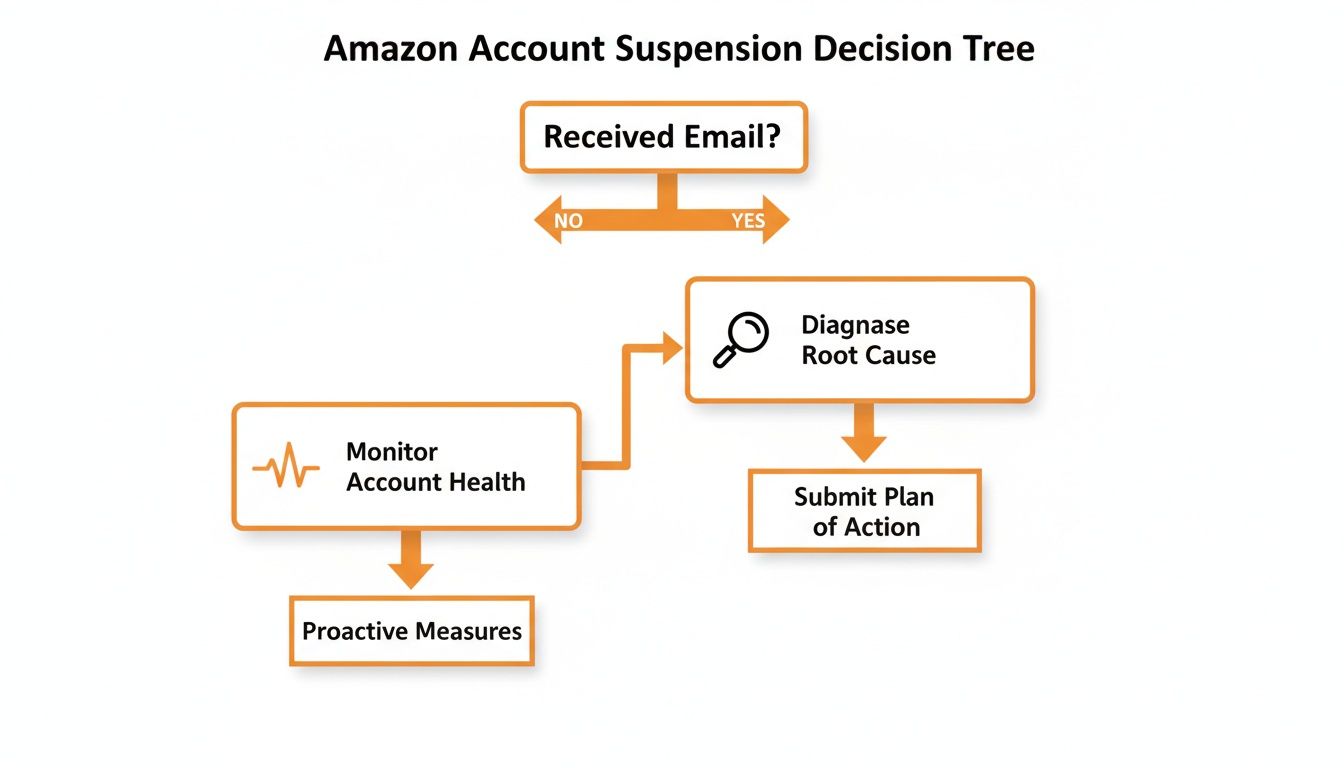
As you can see, getting that official notice is the trigger for a full-blown diagnostic process. If you haven't received one but things feel off, it's time for you to start proactively digging into your account health.
What Not to Do Under Any Circumstances
Before we get into what you should do, let's cover the instant deal-breakers. Making one of these moves can turn your fixable suspension into a permanent ban. I'm not exaggerating.
- Don't Open a New Account: This is the cardinal sin of Amazon selling. Their systems are scarily good at linking accounts through IP addresses, bank details, device IDs—you name it. Trying to get around a suspension this way will get both your accounts permanently shut down. Game over.
- Don't Bombard Seller Support: Sending a dozen emails or making endless calls won't speed things up. It just clogs their system and can flag your case as problematic, which often pushes you to the back of the line.
- Don't Blame Amazon or Your Customers: Your Plan of Action (POA) that deflects responsibility is a guaranteed rejection. You have to own the problem, even if you feel the complaint was completely unfair.
The single biggest mistake I see founders make is replying with emotion. Your appeal is not a conversation; it's a legal document. It requires precision, accountability, and a clear demonstration that you've built systems to prevent the issue from ever happening again.
Your Immediate Action Checklist
Okay, with the "don'ts" out of the way, here are your first concrete steps. Your mission is to secure your data and start the investigation.
- Download Every Report You Can: Log into Seller Central and immediately download all your data: inventory reports, sales data, performance metrics, customer feedback, everything. If your access gets restricted later, this data is gold for your appeal and for managing your business offline. A sudden suspension can mess with everything, especially your ability to calculate basics like your inventory turnover.
- Read the Suspension Notice. Multiple Times: Seriously. Read that email from Amazon three or four times. I know it's filled with vague corporate speak, but the specific policy you violated is almost always in there. Is it "Inauthentic Item," "Used Sold as New," or a high Order Defect Rate? That's your starting point.
- Cross-Reference with Your Account Health Dashboard: Now, go to your Account Health Dashboard and compare what you see with the suspension notice. Look for any metrics in the red or yellow—late shipments, A-to-z claims, negative feedback. The email might name one violation, but the dashboard tells you the whole story.
By taking these measured steps, you stop being a victim and become a business owner leading a recovery mission. You've stopped the bleeding. Now you're ready to diagnose the wound.
How to Gather Evidence for Your Appeal
Okay, you've figured out why you were suspended. Now it's time for you to build your case.
Amazon runs on one thing: proof. Think of your appeal like a court case. You can't just say you’re innocent; you have to show them the evidence that proves it. Your promises mean nothing, but your paperwork means everything.
This is where you put on your detective hat. Every document you pull is a puzzle piece that needs to tell a clear story—what went wrong, why it won’t happen again, and why Amazon should trust you.

Gathering Documents for Inauthentic Claims
If Amazon flagged you for an inauthentic item, this is purely a documentation game. They’re questioning your supply chain, and your only job is to prove it's legit. This means you need to collect invoices from your supplier or manufacturer—absolutely not retail receipts.
There’s a massive difference here:
- Invoices: These come from a real distributor or manufacturer. They must include detailed supplier information (name, address, phone, website), your business details (matching your Seller Central account perfectly), and itemized quantities.
- Receipts: These are from places like Target or Walmart. Amazon sees these as proof of purchase for personal use, not valid sourcing for commercial resale. Submitting a retail receipt is one of the fastest ways to get your appeal shot down.
When you send in your invoices, check that every single detail matches what's in your Amazon account. I once saw an appeal get denied because the business address on the invoice was "123 Main St." while the Amazon account had "123 Main Street." Yep, that tiny difference was enough for the review bot to reject the whole thing.
Digging into Performance Metrics
For performance-based suspensions—things like a high Order Defect Rate (ODR) or Late Shipment Rate—your evidence is sitting right inside Seller Central. You need to pull specific reports to find the exact orders that torpedoed your metrics.
Your goal is to pinpoint the source of the problem. Don't just say, "we had some late shipments." Instead, use the data to say something like, "During the week of May 15th, 12 orders were shipped late due to a carrier delay with UPS, affecting tracking numbers X, Y, and Z."
Here are the key reports you should pull:
- Order Defect Rate Report: This shows you which A-to-z claims, negative feedback, and chargebacks blew up your ODR.
- Valid Tracking Rate Report: This will highlight every shipment with invalid or missing tracking info.
- Customer Service Performance: Check your Buyer-Seller messages. Are your response times lagging? Are customers complaining about the same thing over and over?
You're not just gathering data; you're building a narrative. Each report is a chapter in the story of what went wrong. The more specific your data, the more credible your explanation will be in your Plan of Action.
The Rise of Compliance and Paperwork Issues
It's also super important for you to realize that the reasons for suspensions are always changing. One of the biggest drivers right now is Amazon’s intense focus on compliance, especially after the INFORM Consumers Act kicked in mid-2023.
This law forced Amazon to demand way more verified details from sellers—government IDs, bank accounts, tax info, you name it. At the same time, they cracked down hard on supply-chain documents, making it nearly impossible for arbitrage sellers to use receipts from big-box stores.
For a Chicago founder trying to grow, this means your paperwork and processes are now just as vital as your product. Your supplier invoices and identity documents have to be flawless. You can learn more about these crucial shifts in the Amazon seller landscape.
Crafting a Plan of Action Amazon Will Approve
This is it. This is the moment where you either get your business back or slide into a frustrating loop of automated rejections. Most sellers I’ve worked with get this part wrong because they react emotionally. They write long, defensive essays, blame customers, or deny any fault.
That’s a guaranteed path to failure.
You need to write your Plan of Action (POA) the way Amazon wants to read it. Think of it like a legal brief, not a personal letter. It must be concise, accountable, and laser-focused on solutions. Forget emotion; this is all about process and systems.

The Three Pillars of a Winning POA
Your entire appeal hinges on three core components. If you miss one, or if one is weak, the whole thing falls apart. This isn't just a suggestion from me; it's the exact format Amazon’s investigators are trained to look for.
I always tell sellers to think of it like rebuilding trust with a business partner. You have to admit what you did wrong, explain how you’ve already fixed the immediate damage, and then prove you’ve changed your ways so it will never happen again.
- The Root Cause: What really went wrong?
- Immediate Corrective Actions: What have you already done to fix it for affected customers?
- Long-Term Preventative Measures: What new systems have you already implemented to prevent this forever?
Notice the past tense. You aren't promising to fix things; you're reporting on the fixes you have already completed. This is a crucial distinction and a common mistake I see people make.
Nail the Root Cause
This is the most critical part, hands down. You have to take complete ownership of the problem, even if you feel it wasn't entirely your fault. Amazon doesn’t care about your excuses. They just want to see that you understand the "why" behind the policy violation.
Be specific. Dig past the surface-level issue. For example, if you were suspended for a high Late Shipment Rate, the root cause isn't "packages were shipped late." That’s a symptom, not the disease.
A weak root cause sounds like this:
- "We had some shipping delays that were outside of our control because the carrier was late." (This just blames others and shows you take no ownership.)
A strong, accountable root cause sounds like this:
- "I failed to implement adequate inventory management and order fulfillment protocols. My process did not account for potential carrier delays, and I did not have a backup fulfillment plan, which resulted in 15 orders being shipped after their expected ship date between June 1st and June 7th." (This owns the system failure.)
See the difference? The strong example admits a failure of process, which is something you can actually fix. You can’t fix a carrier, but you can fix your own systems.
Amazon wants to reinstate businesses run by responsible operators. Your root cause analysis is your first and best chance to prove you are one of them. Show them you’ve thought deeply about your operational weaknesses, not just the symptom they flagged.
Show Your Immediate Corrective Actions
Alright, now it’s time for damage control. How did you make things right for the customers who were hit by your mistake? Again, everything here needs to be in the past tense.
This is your chance to show you’ve taken immediate, proactive steps to clean up the mess.
- For Performance Issues: "I have contacted all 15 affected customers to apologize for the shipping delay. I have also issued a full refund for the shipping costs on each of those orders to compensate for the poor experience."
- For Inauthentic Claims: "I have immediately closed and deleted the listing for ASIN B00XXXXXXX. I have audited my entire inventory of 250 units for this product and have physically destroyed all remaining stock to ensure no potentially problematic units can ever be sold."
These actions need to be tangible and complete. Don't say you will contact customers. Say you have contacted them.
Prove You’ve Built a Permanent Solution
Finally, this is where you prove you’ve truly changed. You need to describe the new systems, processes, or software you’ve implemented that make a repeat of the root cause impossible. This section is all about showing Amazon you’ve built a more resilient business.
A weak preventative measure is just a vague promise:
- "I will monitor my shipping times more closely."
A strong preventative measure details the specific changes you've made:
- "I have implemented a daily order audit using [Software Name] to track fulfillment status against Amazon’s ship-by dates. Additionally, I have established a secondary shipping carrier agreement with FedEx as a backup for any future disruptions with my primary carrier, UPS. My warehouse staff has undergone a mandatory retraining on our new two-step order processing protocol, which was completed on June 10th."
This is your proof that you’ve not only learned your lesson but have also invested time and resources to become a better, more reliable seller on their platform. You’re not just asking for another chance; you’re demonstrating that you’ve already earned it.
Submitting Your Appeal and Navigating the Wait
You’ve poured your heart and soul into crafting the perfect Plan of Action. Now what? Submitting your appeal feels like the last hurdle, but how you do it—and what comes next—is just as crucial as the document itself. Don't fumble the ball at the one-yard line.

The submission process inside Seller Central is your one and only shot to present your entire case. Think of it like a job application. You wouldn’t send a resume today and a cover letter next week. You send it all at once, neatly packaged.
The Right Way to Get Your Appeal In
Head over to your Account Health Dashboard, where you'll find the appeal submission button. When you click it, you’ll see a space to write your POA and an option to attach your supporting files. This is where precision is everything.
- Copy and Paste: Your POA goes directly into the text box provided. Don't just attach it as a separate document.
- Attach Everything: This is where you upload all your invoices, reports, and any other evidence you’ve collected. Be smart about how you label your files. Something like "Supplier_Invoice_ASIN_B00XXXXXXX.pdf" makes their job much easier.
- One Complete Package: I can't stress this enough: Do not submit your appeal and then try to add documents later. Amazon reviews cases based on the initial submission. Firing off follow-up emails with more files just creates chaos and can push your case back for weeks.
Once you’ve attached all your proof and pasted your POA, give it one final read. Then, hit submit. The hardest part is over; now the mental game starts.
The waiting period is a brutal test of patience. The timeline is completely unpredictable. I’ve seen accounts back online in a few hours, while others have dragged on for three long weeks. Firing back a slightly tweaked POA 24 hours after a denial just screams desperation.
What to Do While You're in Limbo
The silence can be absolutely deafening. Your gut will tell you to follow up, to poke the bear, to just do something. You have to resist that urge with everything you've got. Bombarding Seller Performance with emails or opening new cases is the fastest way to get shoved to the bottom of the pile.
Here’s your game plan for the wait:
- Don't Pester Them: After you submit, wait at least 7 to 10 days before you even think about a follow-up. Every new email can be flagged as a new submission, potentially resetting your place in line.
- Monitor Your Case Log: Keep a close eye on your case log in Seller Central. This is the only official channel for communication, so if there's an update, it will be there.
- Brace for a Denial: It’s incredibly common to get a generic, automated "no" on your first attempt. Don't panic. This is often just a bot doing a first pass. Your next move is to genuinely re-evaluate and strengthen your POA, not just send the same thing again.
If you get a denial and need to follow up, keep it short and professional. A simple message like, "I have received your response and have revised my Plan of Action with additional details about our preventative measures. Please find the updated POA attached," works perfectly.
This shows you respect their process. You're not arguing—you're providing new, valuable information. Staying cool and professional is non-negotiable. It’s the only way you’ll win this waiting game.
Building a Resilient Business So This Never Happens Again
Getting your account back is the battle. Keeping it active is the war. That suspension notice wasn't just a headache; it was a very expensive business lesson. Let's make sure you never have to repeat it.
It’s time for you to shift from reactive panic to proactive protection, turning your business into a fortress that Amazon’s bots can’t easily breach.
This means building new habits and systems. Your goal is no longer just selling stuff; it's to run an operation so clean that your Account Health Dashboard is always green. Think of it like maintaining your car. You don't wait for the engine to explode before getting an oil change. These daily and weekly check-ins are your routine maintenance.
This isn’t just about dodging another suspension. It’s about you building a fundamentally stronger, more valuable business. A resilient operation gives you the freedom to focus on what actually matters—growth, new products, and building your brand.
Make the Account Health Dashboard Your Best Friend
You need to become obsessed with your Account Health Dashboard. This page is your early warning system. Check it daily. Not weekly, but every single morning with your first cup of coffee. It takes you less than two minutes and can save you from weeks of stress and lost revenue.
Most new founders I meet assume they’ll only get suspended if they’re “bad actors,” but Amazon’s own performance thresholds show how easy it is for a legitimate brand to trip a wire. They expect an Order Defect Rate (ODR) under 1%, a late shipment rate under 4%, and a pre-fulfillment cancel rate under 2.5%.
Let’s say a new brand ships 1,000 orders in its first big month. If just 12 of those orders arrive late, their Late Shipment Rate is 1.2%. Add in a couple of A-to-Z claims or 1-star reviews for packaging damage, and their Account Health Rating (AHR) can easily fall below the 250 AHR threshold Amazon uses for its Account Health Assurance program.
Sellers above that 250 AHR score get a safety net—Amazon agrees not to suspend immediately as long as they can reach you within 72 hours to work on a fix. Below that score? You risk an abrupt deactivation.
Your new daily habit is to open that dashboard and look for anything yellow or red. If you see a metric trending in the wrong direction, you jump on it immediately, before it becomes a real problem.
Systematize Everything With SOPs
The best way for you to protect your account is to remove human error. This is where Standard Operating Procedures (SOPs) come in. These are just simple, written checklists that anyone on your team (even if it's just you) can follow for critical tasks.
Create SOPs for these three key areas:
- Customer Service: How do you respond to messages? What’s your protocol for a return request or a negative review? A clear SOP ensures every customer gets the same excellent, policy-compliant treatment.
- Inventory & Fulfillment: How do you check in new inventory? What’s the process for picking, packing, and shipping to guarantee you never miss a deadline?
- Listing Creation: What are the exact steps for creating a new product listing to ensure it's fully compliant with Amazon's ever-changing rules?
These don't need to be 50-page manuals. A simple one-page checklist in a Google Doc is perfect. An SOP is your business's armor; it’s the system that protects you when you’re busy, tired, or distracted.
Your key performance metrics aren't just goals; they are your survival thresholds. Staying well below the limits for your Order Defect Rate or Late Shipment Rate isn't about getting a good grade—it's about ensuring your business has a buffer against the unexpected. One bad week shouldn't be enough to take you down.
Now, to make this even easier for you, here's a simple checklist you can start using right away.
Your Proactive Account Health Checklist
This isn't just busy work. Think of this table as your regular check-up to catch problems before they become catastrophes. Block out time in your calendar every week and month to run through these tasks.
| Frequency | Task | Why It's Critical |
|---|---|---|
| Weekly | Review Account Health Dashboard for any yellow/red flags. | Catches performance dips (ODR, Late Shipment Rate) before they trigger a warning or suspension. |
| Weekly | Read all new customer feedback and product reviews. | Identifies product quality issues or listing inaccuracies early, preventing A-to-Z claims. |
| Weekly | Check Voice of the Customer (VOC) for Negative Customer Experience (NCX) rates. | Highlights which ASINs are causing problems so you can fix the listing or the product itself. |
| Weekly | Respond to all customer messages within 24 hours. | Protects your Buyer-Seller Messaging metrics and prevents simple queries from escalating. |
| Monthly | Audit your top 5 ASINs for compliance (images, title, bullet points). | Amazon's rules change. A monthly check ensures your most important listings don't fall out of compliance. |
| Monthly | Review your inventory levels and restock plans. | Prevents stockouts, which can lead to canceled orders and dings on your pre-fulfillment cancel rate. |
Making this a routine will feel like second nature in no time. It's the small, consistent actions that build a truly resilient brand on Amazon.
Beware the Danger of Related Accounts
This one is a silent killer for founders, especially those of us in communities like Chicago Brandstarters who might be trying out multiple ideas or helping friends launch their stores. Amazon is incredibly aggressive about linking accounts it believes are operated by the same person or entity.
Amazon connects accounts using a huge range of data points:
- IP addresses
- Bank account information
- Credit card details
- Physical addresses
- Shared computers or Wi-Fi networks
If one of your accounts gets suspended, Amazon can—and often will—shut down every other account it thinks is related to you. I've seen it happen years later. An account you opened for a side project in 2021 could suddenly get your main brand suspended in 2025 if Amazon makes a connection.
The only way for you to prevent this is with absolute separation. If you run multiple Amazon businesses, they need to be treated like completely separate legal and operational entities. That means different bank accounts, different computers, and even different internet connections. This kind of disciplined hygiene is a critical skill, especially if you're exploring how to start an ecommerce business with multiple brands.
By building these proactive systems, you shift from a position of fear to one of control. Your suspension was a wake-up call. Heed it, build a more resilient business, and get back to focusing on what matters: growth.
Your Top Suspension Questions Answered
You’ve made it this far, and I know you probably still have a million questions buzzing in your head. Getting that suspension notice can feel like navigating a maze in the dark.
I get these questions all the time from founders. Here are the straight-up answers you need.
How Long Does It Really Take To Get An Amazon Account Reinstated?
Honestly? It's all over the map. I've seen simple cases get turned around in less than 24 hours. But I've also seen complex messes involving intellectual property or related accounts drag on for weeks, sometimes even months.
The single biggest factor is the quality of your first Plan of Action. If you nail it—clear, well-documented, and direct—you can get a quick green light. But a weak POA just kicks off a frustrating back-and-forth that adds weeks of downtime.
A good rule of thumb for a standard suspension is for you to expect anywhere from 3 to 14 days, assuming your appeal is solid from the get-go.
Should I Pay For An Amazon Suspension Appeal Service?
Walk very, very carefully here. This corner of the industry is a minefield. Yes, there are some great law firms and consultants who specialize in this, but it's also flooded with scammers who use generic templates that can get you permanently banned.
Here's my two cents: for most common issues, you are the best person to write the appeal. Why? Because you know your business, your products, and your processes inside and out.
If you're staring down something truly complex—like a Section 3 violation or a thorny IP claim—and feel completely out of your depth, a professional can be worth it. But they are a last resort for you.
Never, ever hire someone who guarantees reinstatement. No one can make that promise, period. If you do go this route, vet them like your business depends on it, because it does. Ask for real case studies and references.
Can I Just Open A New Amazon Seller Account?
No. Absolutely not. Don't even think about it.
It’s like trying to sneak back into a club after you’ve been kicked out. The bouncer will recognize you, and you'll be banned for life. Amazon's systems for linking accounts are incredibly sophisticated. They look at everything—your name, your bank info, your IP address, your device ID, your warehouse address, you name it.
Trying to open a new account while another is suspended is the fastest way to get both of them shut down forever. Your only path forward is to fix the original account.
What Is The Difference Between A Suspension, Deactivation, And A Ban?
These words get tossed around a lot, but they mean very different things.
-
Suspension / Deactivation: This is a temporary time-out. Amazon has put your selling privileges on hold and is waiting for you to submit a Plan of Action. It’s a serious problem, but it’s a fixable one. You have a chance to appeal.
-
Ban: This is the end of the road. A ban means Amazon has reviewed your appeal(s) and has made a final, irreversible decision. You can no longer sell on the platform.
This is exactly why that first appeal is so critical. You have to get it right to avoid ever reaching that final "denied" stage. An unexpected ban can also create some serious liability issues, which is why having the right protections in place from the start is so important. You can find more details in our guide to business insurance for your online store.
Dealing with these challenges is tough, but you don't have to do it alone. At Chicago Brandstarters, we connect founders to share honest war stories and practical solutions in a confidential, supportive community. If you're a kind, hardworking builder in the Midwest, we invite you to join us.