Most advice about a blog for your store is bad.
It tells you to publish often, chase keywords, and “build brand authority.” That's how founders end up with a graveyard of polite articles nobody reads and nobody buys from. A blog about ecommerce shouldn't exist to fill a content calendar. It should pull weight like a strong operator on your team.
I'd treat it like this. Your blog should answer sales objections before a customer emails you. It should reduce support load after checkout. It should help the right buyers find you through search. It should make your store easier to trust. If a post can't do one of those jobs, I wouldn't publish it.
That mindset matters because ecommerce isn't some tiny corner of the internet anymore. Worldwide e-commerce sales are projected at $7.5 trillion in 2025, with 2.77 billion people shopping online, and 85% of global consumers shopping online according to Cimulate's ecommerce statistics. You aren't writing into a vacuum. You're building a practical sales and support asset inside a channel where online buying is normal behavior.
Stop Thinking About a Blog for Your Ecommerce Brand
Most founders think “blog” and picture article writing.
That's the mistake.
A real blog about ecommerce is closer to a customer-facing operating manual for your business. It answers the same questions your support inbox sees every week. It handles the same hesitation your shoppers feel on product pages. It keeps working while you sleep, while your team packs orders, while you're stuck dealing with inventory problems.
Replace the publishing mindset
If you publish random top-of-funnel fluff, you'll get random results. Maybe some traffic. Maybe a few email signups. Usually a lot of wasted effort.
I want you to ask a harder question: what business problem should this content solve?
Here are better jobs for a blog:
- Reduce buyer confusion by explaining sizing, compatibility, ingredients, materials, or shipping timelines.
- Improve conversion quality by attracting people who already have the problem your product solves.
- Cut repeat questions by turning support answers into public content.
- Increase repeat purchases by teaching customers how to use, maintain, or get more value from what they bought.
A weak blog chases attention. A strong one removes friction.
If you need a simple starting point, Feather has a practical breakdown of strategies for effective business blogging. I like it because it helps you think about purpose before volume.
Think employee, not channel
I'd hire a blog the same way I'd hire a teammate.
Would I hire someone whose only job was “post twice a week”? Of course not. I'd give them a job description tied to outcomes. Answer customer questions. Support revenue. Make the buying process easier. Build useful pages that bring in qualified traffic.
That's the frame I want you to keep for the rest of this article. Stop trying to “have a blog.” Build a tool that makes your company easier to run.
Define Your Blog's Job Before You Write a Word

Before you write a post, write a job description.
That sounds boring. It's also the difference between content that compounds and content that dies. If your blog has three jobs, it usually does none of them well. Pick one primary job first. You can expand later.
The one-sentence test
Write this sentence and force yourself to finish it:
“Our blog exists to help [audience] do [specific outcome] so we can [business result].”
Examples:
- Our blog exists to help first-time buyers choose the right product so we can improve conversion quality.
- Our blog exists to help customers understand shipping, exchanges, and returns so we can lower support friction and protect repeat purchases.
- Our blog exists to help shoppers solve a problem related to our category so we can attract qualified organic traffic.
That one sentence will save you from publishing junk.
If you're loose on your business targets in general, clean that up first. This guide on how to set business goals is useful because it forces you to connect activity to an actual outcome.
The job I think most brands ignore
Here's my opinion. Too many ecommerce founders use content only to chase pre-purchase traffic.
That's lazy.
One of the most useful angles is post-purchase operations. Saleslayer points out that an underserved angle for ecommerce content is content that clarifies shipping and simplifies returns in its write-up on ecommerce challenges for online stores. I agree. Most stores treat these issues like boilerplate policy pages. Customers don't experience them that way. They experience them as anxiety.
A customer doesn't care that your warehouse flow is messy. They care that they don't know when the package will arrive, whether they can swap a size, or how painful a return will be.
Practical rule: If support gets the same question twice in a week, your blog probably needs a page for it.
Pick from four real jobs
I like this simple framework:
Sales job
Create comparison pages, buying guides, and objection-handling FAQs.Support job
Publish shipping explainers, care instructions, setup help, exchange steps, and policy clarifications.Retention job
Teach people how to use the product better so they buy again and stick around longer.Acquisition job
Target problem-aware search queries that bring in people likely to buy later.
If you need help turning that into an editorial plan, Outrank has a solid piece on content strategy for growing brands. Use it after you've chosen the job, not before.
Your Quick and Dirty Ecommerce Blog Setup
You don't need a six-week project. You need a setup you can trust by Sunday night.
The two paths most founders look at are simple. Use your store platform's built-in blog, or run a separate WordPress site. I've done both. My opinion is blunt: if you're early, keep it simple unless you have a strong reason not to.
Shopify blog or WordPress
Here's how I'd choose.
| Setup | Use it when | Watch out for |
|---|---|---|
| Shopify blog | You want speed, simple publishing, and tight connection to product pages | Fewer customization options |
| WordPress | You need more editorial control, templates, or content-heavy architecture | More upkeep and more ways to break things |
If your store is on Shopify and content is there to support products, I'd usually start with Shopify. One domain. One system. Fewer moving parts. Less chance you'll create a weird split where the blog gets traffic and the store gets ignored.
If you're building a media-heavy site with lots of custom templates, layered categories, and broader editorial ambitions, WordPress can make sense. But don't choose it because somebody on the internet said it's better for “serious SEO.” Choose it because you need the flexibility.
The setup checklist I'd use
This is the basic setup. No drama.
Pick clean URLs
Keep slugs short and readable. Cut filler words.Write strong title tags
Put the main topic first. Make it clear, not cute.Write meta descriptions
Treat them like ad copy. Tell the reader what they'll get.Use one clear H1
Don't get fancy with heading structure.Add internal links
Link from posts to product pages, collection pages, FAQs, and policy pages where relevant.Create a default post template
Intro, useful body sections, FAQ, product CTA, related links. Done.Make mobile reading easy
Short paragraphs. Clear subheads. No giant text walls.
A simple project outline helps here. If you need one, this website project plan is a good sanity check before you start changing themes or plugins.
My default stack
If I were starting from scratch this weekend, I'd use:
- Shopify blog for speed
- Google Analytics 4 for traffic and conversion tracking
- Shopify Analytics for revenue and product behavior
- Google Search Console for query and indexing visibility
- A basic spreadsheet or Notion for content planning
That's enough to publish, link content to products, and measure whether any of it matters.
Your setup should feel boring. Boring is good. Boring ships.
Building Your Content Machine
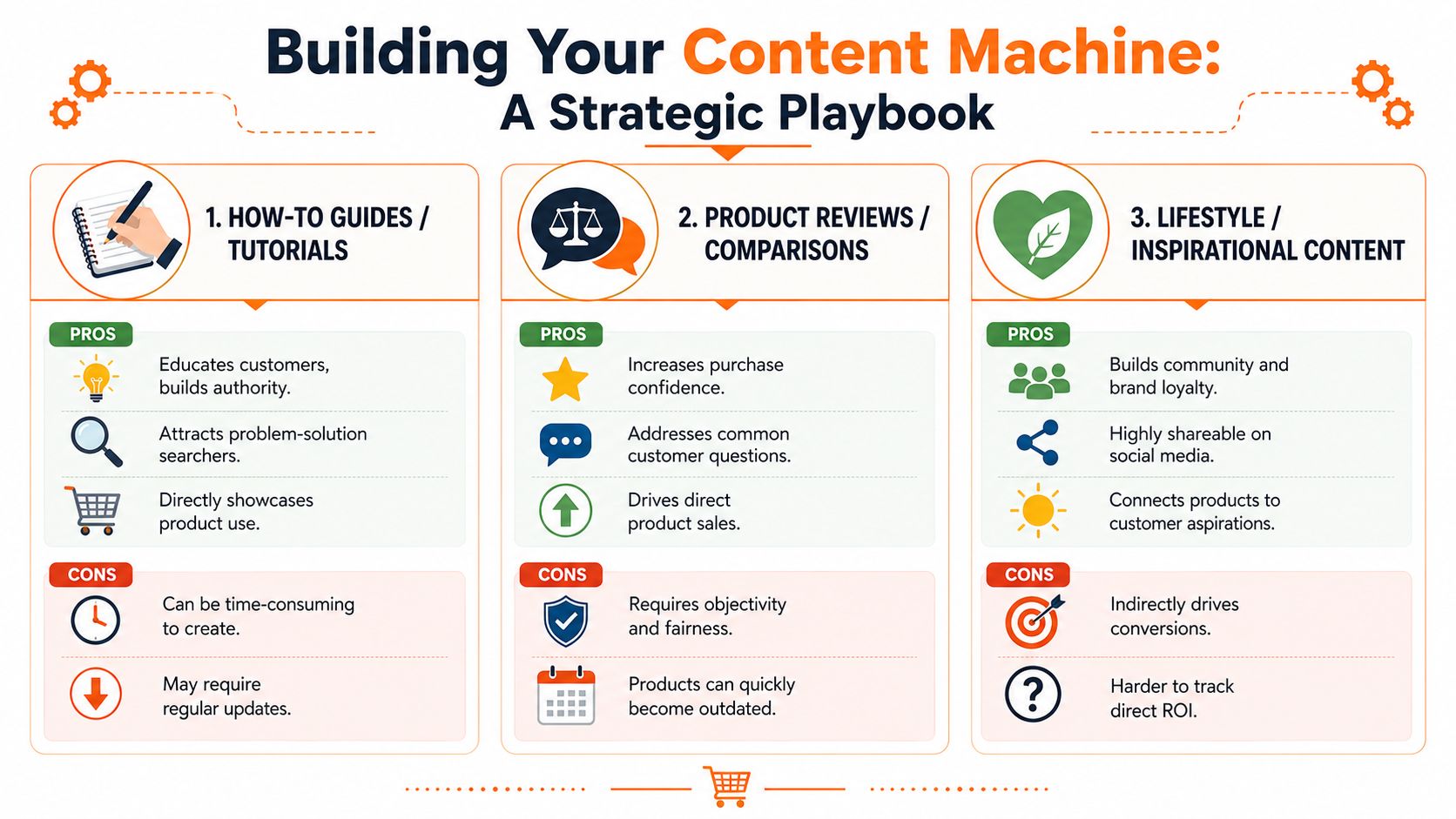
The biggest content mistake I see is writing only one type of post.
Usually it's fluffy educational stuff that never gets close to a sale. A healthy blog about ecommerce needs a mix. I think in three buckets: content for strangers, content for shoppers, and content for customers who already bought.
Write for the full buying path
Here's the simplest version.
People who don't know you yet
These readers have a problem, not brand awareness.
Write:
- How-to guides tied to the problem your product solves
- Educational FAQs around confusing category terms
- Use-case articles that help people decide whether they even need a product like yours
This content is your handshake.
People comparing options
These readers are closer to money.
Write:
- Comparison pages
- “Best for” guides
- Product selection explainers
- Shipping and returns explainers
- Objection pages
This content is your closer.
People who already bought
Most brands stop here. Bad move.
Write:
- Care guides
- Setup help
- Troubleshooting posts
- Reorder reminders
- Upgrade and accessory guides
This content protects margin and repeat purchase behavior.
Build pages AI can understand
Search behavior is changing. Buyers ask AI tools questions the way they'd ask a smart store associate. Bloomreach makes this point well in its piece on ecommerce customer experience and AI-driven discovery. I agree with the core idea. Your content should work more like a machine-readable knowledge base than a diary.
That means I'd prioritize:
- Comparison pages with clear criteria
- FAQ clusters that answer one real question per section
- Shipping pages written in plain language
- Returns and exchange explainers
- Buying guides with structured headings and direct answers
If a customer can ask the question in one sentence, your page should answer it in one screen.
A small-brand playbook I'd actually run
Let's say you sell premium dog harnesses.
Most brands write “5 Summer Adventures With Your Dog.” Fine. Cute. Weak.
I'd rather publish:
- How to choose the right dog harness size
- Front-clip vs back-clip harness
- How our shipping works and when orders arrive
- How exchanges work if the fit is wrong
- How to stop chafing during long walks
- Best harness for small dogs that pull
- How to wash a dog harness without damaging it
Now your blog is selling, supporting, and retaining at the same time.
One post should feed many channels
Don't create from zero every time. Build an ecosystem. Viral.new has smart advice on content repurposing strategies, and that mindset is right for scrappy teams.
A single strong post can become:
- An email to buyers or prospects
- A short video script for social
- A support macro your team can send
- A product page FAQ update
- A founder LinkedIn post with one sharp takeaway
That's how you build a content machine. One source asset. Multiple outputs. Real business use.
Getting Eyeballs Without Paying for Ads
A small brand can get traffic without burning cash. It just can't act lazy.
I've watched this happen a lot. A founder publishes three good articles, sees no immediate spike, and gives up. The main work starts after publish. Distribution is where scrappy operators beat bigger brands because most bigger brands move slowly and sound like committees.
Start with easy SEO wins
In the U.S., ecommerce grew 5.1% year over year, faster than total retail at 4.1%, according to these U.S. ecommerce statistics for 2025. That matters for one reason. Basic search visibility is worth your time because the channel keeps taking share.
My approach is simple. Look for questions with buyer intent hiding inside them.
Good examples:
- how to choose
- best for
- compare
- size guide
- shipping time
- return policy
- care instructions
- compatibility
Those are usually less crowded than generic trophy keywords. They also bring in people who need help.
A realistic founder workflow
Here's a scrappy weekly loop I like:
Monday
Check search queries in Google Search Console. Look for impressions on weird, specific phrases.Tuesday
Turn one support question into one short article or FAQ block.Wednesday
Add links from that article to products, collections, and one email signup.Thursday
Send the article to customers, prospects, and a few partners.Friday
Repost the main point as a short social post and a founder note.
That loop works because it uses material your business already produces. You don't need a brainstorm session. Your support inbox is the brainstorm.
Partnerships without spam
Backlinks are still useful, but most outreach is embarrassing.
Don't send “I loved your article, can you link to my post?” Nobody likes that person. Send something useful.
Try angles like:
- Offer a better resource for a question their audience already has
- Suggest a content swap where both brands answer one shared customer problem
- Create a useful quote or expert contribution they can use
- Share customer insight from your support or fulfillment side
A local or niche brand can also build referral loops with creators, suppliers, and adjacent stores. If you want a clean way to think about incentivized word-of-mouth, this guide on how to create a referral program is worth reading.
Most outreach fails because it asks for attention before offering utility.
Use channels you already own
Your email list is usually your easiest traffic source. Use it.
Every new post should have a home in:
- Your welcome flow
- Post-purchase emails
- Support responses
- Founder social posts
- Partner newsletters if relevant
A good article shouldn't be published once. It should keep showing up where a buyer already has context.
How to Know if Your Blog Is Actually Working
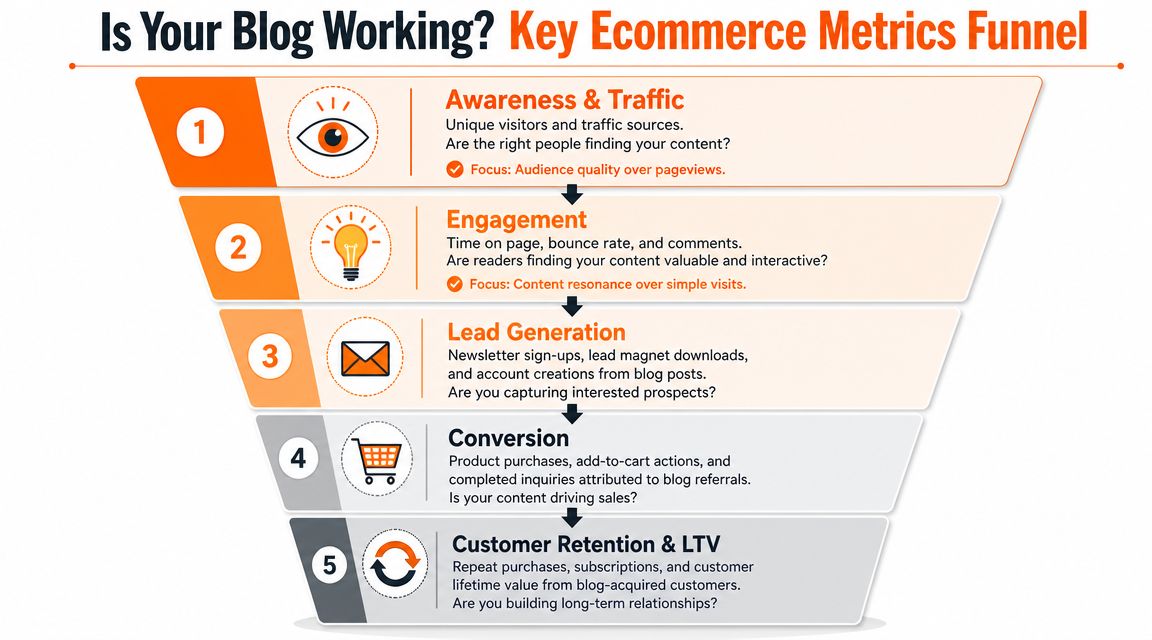
Pageviews flatter you. They do not help you run the business.
Measure whether the blog brings in qualified buyers, lowers friction after purchase, and creates customers worth keeping. If you cannot connect content to revenue quality or retention, you are publishing for sport.
The dashboard I'd build first
Use GA4 or Shopify Analytics. Keep the first dashboard brutally simple so you will check it.
Track these every day:
| Metric | Why I care |
|---|---|
| Revenue | Shows whether the business moved |
| Orders | Shows purchase volume |
| Conversion rate | Shows whether traffic is qualified and the funnel is healthy |
| Traffic sources | Shows where useful visitors come from |
| Top products | Shows which items content may be supporting |
Then go one level deeper:
- Assisted conversions from blog traffic
- Acquisition month cohorts
- Customer retention by channel
- CAC and CLV by channel
That is where the blog stops being a content project and starts acting like an operating asset.
CAC can lie to you
Improvado makes the right point in its article on measuring ecommerce analytics. A more expensive channel can still win if it brings back better customers. Cheap acquisition only looks smart when you ignore what happens after the first order.
This matters even more for blog traffic. A post can attract a wave of readers who convert once, chase a discount, create support load, and never return. That traffic is not helping. It is borrowing tomorrow's margin to make this month's report look cleaner.
Judge content by the customers it creates, not the clicks it attracts.
Use conversion benchmarks the right way
Adobe's overview of ecommerce conversion rate benchmarks is useful for calibration, not validation. Benchmarks help you spot mismatches between intent and execution.
If blog traffic converts well below the rest of the site, ask better questions:
- Are these the wrong readers?
- Are the posts too far from purchase intent?
- Are readers getting routed to the wrong product or collection pages?
- Does the content create interest without building enough trust to buy?
Adobe also points operators toward stronger testing methods, including A/B tests and holdout-based approaches, when the goal is to measure lift instead of coincidence. Use that standard. Correlation is how weak content survives review meetings.
The alert thresholds I like
You do not need a giant BI stack. You need alerts that tell you when something broke.
Adobe notes that teams can set alerts when:
- Daily revenue drops by more than 15%
- CAC spikes by more than 30%
- Conversion rate falls by more than 10%
That gives you an early warning system.
Then do the operator work. Check whether a key post lost rankings, whether a CTA got buried, whether a product page changed, or whether a once-useful article is now attracting the wrong visitor. Good blog reporting is not a monthly vanity slide. It is a fast feedback loop for fixing what hurts revenue.
Your First 90 Days and Simple Templates
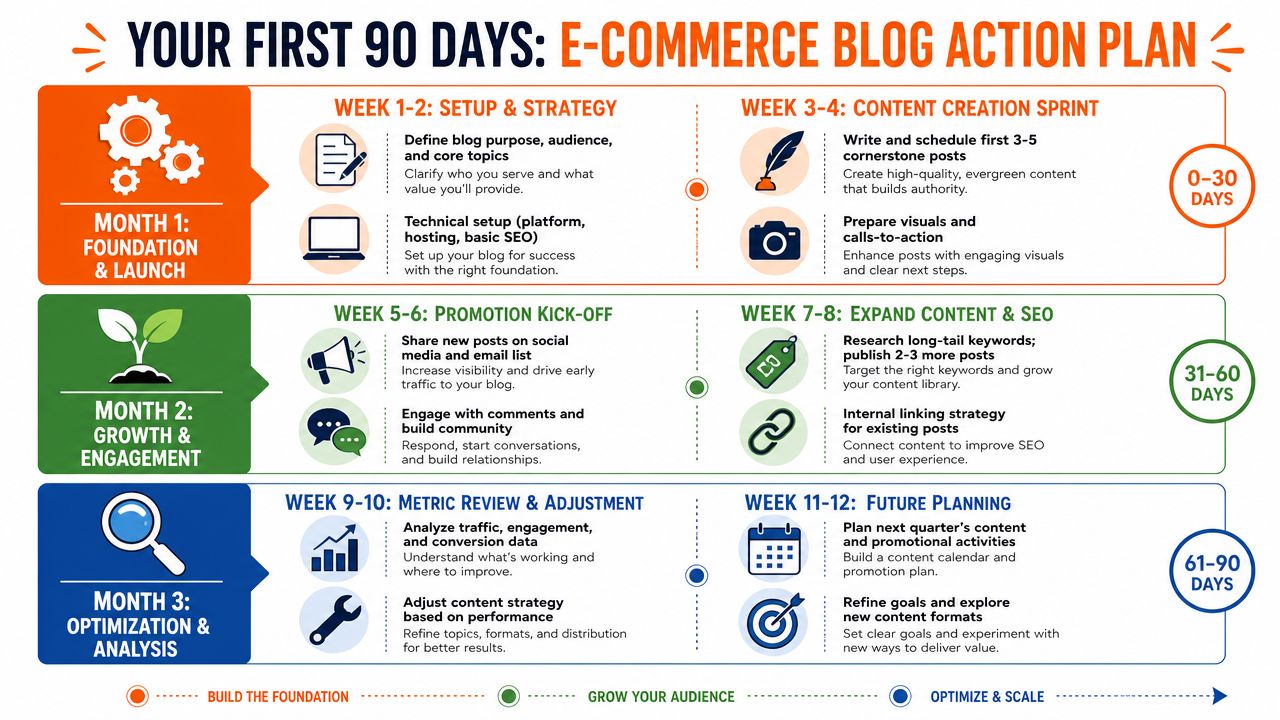
You don't need a giant strategy deck. You need reps.
For the first month, set up the blog, pick its job, and publish a small batch of useful pages. I'd start with one comparison post, one FAQ cluster, one shipping or returns explainer, and one product-adjacent how-to guide. Then link each post to the right product or collection page.
In the second month, distribute hard. Send every post through email. Rework each one into short social posts. Add internal links from older posts. Watch which topics pull qualified traffic and which ones bring curiosity with no purchase behavior.
This short walkthrough can help when you're stuck on execution.
By the third month, tighten the machine. Cut weak topics. Expand the posts that assist conversions. Add better calls to action. Turn repeat support questions into new pages. Keep the winners and stop romanticizing the rest.
Template for a content brief
Working title
Clear and specific. No clever headline games.Primary job
Sell, support, retain, or acquire.Target reader
New shopper, comparing shopper, or existing customer.Main question
What exact question does this page answer?Related product or collection
Where should the reader go next?Proof needed
Product details, shipping facts, return steps, support input.CTA
Shop now, compare options, start an exchange, join email list.
Template for an outreach email
Hi [Name],
I run [Brand], and we recently published a practical guide on [topic].I thought of your audience because you already talk about [related topic]. If it's useful, I'm happy to send over a short custom tip, quote, or resource your readers can use.
If there's a fit, great. If not, no worries.
Thanks,
[Your Name]
Most founders don't need more advice. They need a tighter plan and fewer excuses.
If you're building an ecommerce brand in Chicago or the Midwest and want real feedback from other operators, take a look at Chicago Brandstarters. It's a free vetted community with small private dinners and an active founder group chat, built for people who want honest conversations about growth, problems, and what to do next.
Leave a Reply